Everything you need to protect,
recover, and scale
Kafka

Kannika Armory delivers business continuity, compliance, and data resilience for organisations running Apache Kafka, without writing a single line of custom code.

Features

Intuitive interface

We have GUI, REST API and Kubernetes CRDs. Kannika Armory has got you covered.

Frictionless backup and restore

Configure the backup of all your data in just a few steps, and quickly restore a selection of your data when needed.

All major event hubs supported

Whether you want to use Apache Kafka, Confluent Kafka, MSK, Pulsar, Redpanda, or Azure Event Hub, we got you covered.

Blazingly fast, minimal footprint

Automatically create your migration dataset as soon as it changes. Kannika Armory is real-time.

Control and filter your restore process

Restore your data with full control, including additional filtering that allows you to define the set of data you want to restore.

Compressed dataset

Down to 10% of its original volume, leading to cost & storage savings and increased speed.

Schema mapping

Different environments use separate schema registries that assign different IDs to the same schema. Kannika Armory automatically translates schema IDs from source to target during restore or cloning, so your messages stay compatible with the destination cluster.

Offset mapping

Restored messages receive new Kafka offsets, which would cause consumers to reprocess or skip data entirely. Kannika Armory calculates the equivalent offsets in the target cluster, so your consumers continue exactly where they left off.

How it works
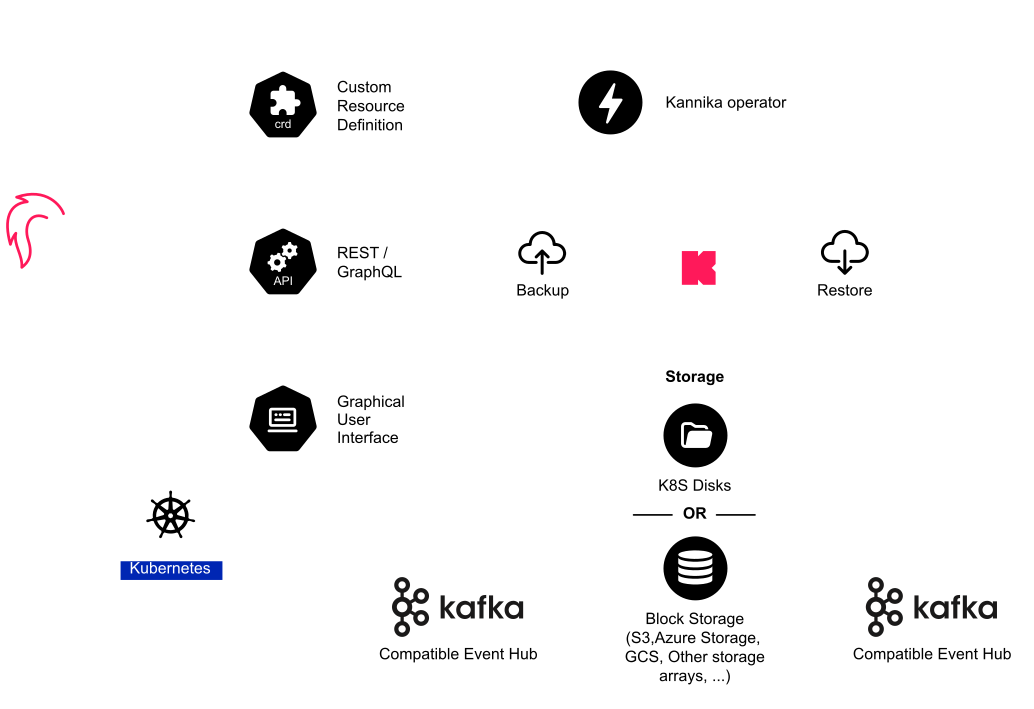
Diagram: the Kannika Armory operator on Kubernetes, driven via the GUI, REST/GraphQL API, or Custom Resource Definitions, backs up a Kafka-compatible event hub to Kubernetes disks or block storage (S3, Azure, GCS) and restores to any other Kafka-compatible event hub

Alternatives

Kannika Armory is the only solution in this comparison that combines continuous real-time backup, true point-in-time restore, and enterprise support in one platform.

Kafka backup and restore alternatives compared: Kannika Armory, Kafka Connect based solutions, Confluent Cluster Linking with Schema Linking, self-managed replication (MirrorMaker 2 or Confluent Replicator), OSO Kafka Backup (open source), and Kafka Tiered Storage.
Features / SolutionsKannika ArmoryKafka Connect based solutionsConfluent Cluster Linking + Schema LinkingSelf-managed replication: MirrorMaker 2 / Confluent ReplicatorOSO Kafka Backup (open source)Kafka Tiered Storage
Mature enterprise solution with dedicated support team and clear roadmap~community-maintainedcommunity-maintained
Purpose-built for Kafka backup and restoredata integration frameworkreplication for availabilityreplication for availabilitystorage cost optimization
Graphical User Interface for backup and restoreCLI-only
Continuous real-time backup (near-zero RPO)~copies continuously, no restorable backupmirror, not a backupmirror, not a backupscheduled snapshotsoffloads only closed segments
True point-in-time restoreany topic, timestamp or offset~snapshot moments only
Easy setup/maintenancemanual CLI and scheduling~broker plugin to deploy and maintain
Protection from human error and accidental deletesmirrors the mistakemirrors the mistake~up to the last snapshotdeletes cascade to the remote tier
Consumer group offset mapping on restoreconsumers resume where they left off~~checkpoint translation to configure
Environment cloning with schema mapping across environments
Compressed data backup (down to a fraction of its original volume)raw log segments
Restore features such as topic renaming, filtering with timestamp
Vendor agnostic, support for all major event hub technologies and storage optionsConfluent clusters only~no K8s volumesKafka 3.9+ or Confluent only
Product + infrastructure costLowHighVery high, double infra costMediumsecond cluster + engineering timeLowpaid enterprise tier + engineering timeMediumcuts broker disk cost, but is not a backup

Comparison last updated: July 2026.

Missing a capability in this comparison? We are always open to ideas for new features, and our roadmap is shaped together with our users. Tell us what you need or bring it up in our Slack community.

Ready to see
it in action?

Book a 30-minute live demo or start a free trial, no credit card required.

Kafka backup FAQ

Comparing the alternatives

|
Is Kafka replication a backup?

No. Replication keeps clusters in sync for availability, but it also mirrors deletes, corruption, and ransomware to the replica within seconds. Recovery needs an independent, point-in-time copy stored outside the cluster, which is what Kannika Armory provides. Read why replication is not a backup for Kafka.

What is the difference between Kafka replication and Kafka backup?

Replication continuously copies data between live clusters to survive infrastructure failure; a backup is an independent, point-in-time copy with its own lifecycle that survives logical failure, deletion, corruption, ransomware, and can be restored even if the original cluster no longer exists. Mature Kafka platforms run both: replication for availability, Kannika Armory for recovery.

Can I use Kafka Connect for backups?

Sink connectors can copy events to object storage, but a copy is not a recovery plan: there is no point-in-time restore, consumer group offsets are not mapped back, schema IDs diverge between environments, and every restore is a bespoke replay pipeline your team must build and test. Read why Kafka Connect backups become a trap.

Is Confluent Cluster Linking a backup solution?

No, and it is not meant to be. Cluster Linking is excellent at byte-for-byte replication between Confluent clusters for availability and geo-distribution. Because it mirrors everything, it also propagates deletes and corruption instantly, offers no point-in-time restore, and requires a full second cluster. Kannika Armory complements it with an independent, immutable backup, and works with Confluent Platform and Confluent Cloud.

Is MirrorMaker 2 a backup tool?

No. MirrorMaker 2 is Apache Kafka's replication tool: it keeps clusters in sync, but it also replicates bad deploys, deletes, and ransomware within milliseconds, and cannot restore to a state before an incident. For recovery you need point-in-time backups, the job Kannika Armory is built for. See the full comparison table.

What is the best Kafka backup solution?

The best Kafka backup solution captures topics, offsets, and schemas continuously, restores to any point in time, and stores backups immutably with audit-ready evidence for DORA and NIS2. Kannika Armory is the purpose-built, vendor-agnostic platform that delivers all of this without custom code. See the full comparison table.

Can Confluent Replicator be used as a Kafka backup?

Confluent Replicator is a Kafka Connect-based replication tool, so it has the same limits as any replication approach: it mirrors mistakes to the target, provides no point-in-time restore, and doubles infrastructure. It protects availability; an independent backup platform like Kannika Armory protects the data itself.

Does Confluent have a backup and restore solution for Kafka?

Confluent provides replication (Cluster Linking, Replicator) and Tiered Storage, strong tools for availability and storage cost, but none of them is a point-in-time backup and restore solution. Kannika Armory adds exactly that layer and integrates with Confluent Platform and Confluent Cloud, including Schema Registry mapping. SVA, one of the largest Confluent partners in EMEA, partnered with Kannika for exactly this reason.

Can AWS MSK Replicator back up an Amazon MSK cluster?

MSK Replicator is managed cross-cluster replication: ideal for regional failover, but it copies corruption and deletions along with everything else and cannot restore data as it existed before an incident. For Amazon MSK, Kannika Armory provides continuous point-in-time backup to your own S3 buckets, with offset and schema mapping on restore.

Is Kafka Tiered Storage a backup?

No. Tiered storage (KIP-405) lowers broker disk cost by offloading older segments to object storage, but those segments remain owned by the live cluster: topic deletion, retention expiry, and corrupted writes cascade to the remote tier, reading requires running brokers, and nothing can be restored to a different cluster. It is cost optimization, not recovery.

Can I use Velero to back up Kafka running on Kubernetes?

Velero snapshots Kubernetes volumes and resources, which is useful for cluster state, but volume snapshots taken across running brokers are not consistent, cannot restore a single topic or a point in time, and know nothing about consumer group offsets or schemas. Kafka data needs a Kafka-aware backup like Kannika Armory; Velero can complement it for the rest of your cluster.

Are custom scripts a good way to back up Kafka?

Console-consumer dumps and DIY scripts are how many teams start, but they must be maintained forever, rarely handle consumer group offsets or schema IDs, are hard to test, and usually fail exactly when they are needed. A purpose-built platform like Kannika Armory removes that engineering burden with a supported, auditable backup and restore workflow.

How does Kannika Armory compare to OSO Kafka Backup?

Both are purpose-built Kafka backup tools. OSO Kafka Backup is open source, takes scheduled snapshots, and is driven from the command line. Kannika Armory backs up continuously for a near-zero recovery point, adds a full GUI alongside its REST API and Kubernetes CRDs, and is an enterprise product with a dedicated support team and a clear roadmap. The full comparison is in the table above.

How does Kannika Armory compare to open-source Kafka backup tools?

Open-source tools typically snapshot on a schedule, are operated by CLI, and leave enterprise capabilities, support and SLA, security features, audit, to you or to paid add-ons. Kannika Armory is continuous rather than scheduled, self-service through a GUI, and enterprise-ready out of the box, validated in production at companies like Engie and KOR Financial.

Why are scheduled snapshots not enough for Kafka backup?

Everything produced after the last snapshot is unprotected: with hourly snapshots an incident can cost up to an hour of events, and event streams cannot be re-asked. Continuous backup closes that gap, Kannika Armory captures streams in real time for a near-zero recovery point objective (RPO).

What should a Kafka backup tool do with consumer group offsets?

Restored messages receive new offsets, so consumers would reprocess or skip data unless the backup tool maps offsets. Most alternatives, Connect pipelines, replication, tiered storage, do not solve this. Kannika Armory backs up consumer group offsets with the data and calculates the equivalent offsets in the target cluster, so consumers resume exactly where they left off.

Why does schema ID mapping matter when restoring Kafka data?

Different environments assign different schema registry IDs to the same schema, so restored or cloned messages can become unreadable in the target cluster. Kannika Armory automatically translates schema IDs from source to target during restore and cloning, a capability replication tools and Connect pipelines do not provide.

Which Kafka backup approach protects against ransomware?

Only an independent, immutable copy outside the cluster, replication and tiered storage propagate ransomware encryption within seconds. Kannika Armory writes continuous backups to immutable, air-gappable storage in your own cloud account. Read how to protect Kafka from ransomware.

What does a Kafka backup cost compared to running a second cluster?

Replication-based protection requires a full second cluster, double the brokers, storage, and often licensing, running continuously. Backup-based protection stores compressed data (down to roughly 10% of original volume) in low-cost object storage. That is why the comparison table rates replication "very high, double infra cost" and Kannika Armory "low".

What is the alternative to MirrorMaker 2 for Kafka disaster recovery?

For infrastructure failure, MirrorMaker 2 or Cluster Linking remain the right tools. For logical failure, deletion, corruption, ransomware, bad deploys, the alternative is a purpose-built backup platform: Kannika Armory delivers continuous backup with point-in-time restore, offset and schema mapping, and compliance-grade audit trails, alongside or instead of replication.

About Kannika Armory

|
What is Kannika Armory?

Kannika Armory is designed to simplify your event data backup and restore needs. It allows you to seamlessly connect to your event hub of any type, select and organize the topics you wish to back up, and securely store them in a location of your choice. When the need arises to restore your event data, Kannika Armory offers an intuitive interface to select the data to restore and the destination for the restoration.

What is an event data backup and restore solution?

An event data backup and restore solution is a tool that empowers you to offload and safeguard your critical operational and analytical data stored within your event hub. When the time comes to recover this event data, it enables you to precisely reproduce the data in its original sequence.

Why do I need to backup my events?

Backing up events is crucial for multiple reasons. Firstly, it acts as a safeguard against data loss stemming from human errors like misconfigured retention settings. Moreover, it plays a pivotal role in disaster recovery, ensuring the swift and efficient recreation of event data in the case of unexpected failures. This approach offers a cost-effective alternative to permanent replication.

Which events should I consider backing up?

In modern Event-Driven Architectures, it’s crucial to prioritize backing up business events. These events capture real-time occurrences independently of consuming applications and provide rich behavioral data, offering valuable insights for loosely coupling and reusing applications. Storing them in event hubs facilitates ordered processing and efficient read model creation, benefiting both applications and businesses.

How can I use Kannika Armory?

Using Kannika Armory is a straightforward process. First, deploy Kannika Armory in your Kubernetes cluster. As it is Kubernetes native, it can be deployed anywhere, on-premise, in the cloud or even on your own machine. Then, you have multiple options for control:

- Utilize the user-friendly graphical user interface to navigate the backup and restore processes.
- Leverage the command-line interface for automation and integration into your pipelines.
- Integrate with Kannika Armory using its APIs, allowing you to customize your interactions.

Find more information on our documentation website on how to get started.

Does it have a user interface?

Absolutely! Kannika Armory boasts a responsive user interface that empowers you to initiate and monitor backup processes, commence restoration procedures, and analyze detailed reporting. This interface ensures that you and your team have full visibility into the backup and restore solution’s operations.

What is the pricing associated with using Kannika Armory?

We understand that each deployment is unique. To provide you with a tailored pricing solution, please reach out to our team for more information. We’re here to assist you.

If you want to try out Kannika Armory for free, please ask for a free trial license and try Kannika Armory for 30 days.

Can I try it out for free?

Yes of course!

Kannika Armory can be used when you have a free trial license. Fill in our free trial form or get in touch via e-mail or Slack and we will send you a free trial license which is valid for 30 days.

How can I get started with Kannika Armory?

Getting started with Kannika Armory is easy. Simply contact our team via e-mail or through Slack, and we'll arrange a comprehensive demo and explanation session.


If you want to try it out yourself, go to our documentation website and get started!


We'll guide you through the deployment and installation process, ensuring a smooth start to your backup and restore journey.

How do I backup Apache Kafka topics?

Deploy Kannika Armory in your Kubernetes cluster, connect it to your Kafka environment, and it continuously backs up topics, consumer group offsets, and schemas to S3, GCS, or Azure Blob. Restoring is a single self-service operation via the UI, CLI, or API.

What Kafka platforms does Kannika Armory support?

Kannika Armory supports Apache Kafka, Confluent Cloud, AWS MSK, Azure Event Hubs, and Redpanda, any Kafka-compatible platform. It is fully vendor-agnostic, so you are not locked in to a specific provider.

What storage backends does Kannika Armory support?

Kannika Armory can store backups on AWS S3 (and S3-compatible endpoints such as MinIO or Ceph), Azure Blob Storage, Google Cloud Storage, and Kubernetes PersistentVolumes for on-premises or local deployments.

Does Kannika Armory back up consumer group offsets and schemas?

Yes. Kannika Armory continuously backs up Kafka topics, consumer group offsets, and Confluent Schema Registry schemas. Offset preservation ensures your consumers resume exactly where they left off after a restore, without reprocessing or skipping events.

Can I restore to a different Kafka cluster?

Yes. You can restore topics from a backup to any Kafka-compatible cluster, for example from AWS MSK to Confluent Cloud, or from production to staging. Topic names can be remapped during restore, so you are not forced to use identical names on the target cluster.

Can I restore only specific topics?

Yes. Kannika Armory supports selective topic restore, you choose exactly which topics to recover without needing to restore the entire cluster. You can filter by topic name, time range, or offset, giving you precise control over what data is restored and where.

Does Kannika Armory support point-in-time restore?

Yes. Kannika Armory lets you restore topics to any specific point in time using date/time or exact offset filters. This enables precise recovery after accidental deletion, a bad deployment, misconfiguration, or a ransomware attack, down to the exact moment before the incident.

Can I clone my production Kafka environment to staging or dev?

Yes. Kannika Armory can restore a complete production Kafka environment, topics, consumer group offsets, and schemas, to a staging, test, or dev cluster in under one hour. No manual scripting or Kafka expertise needed. This is one of the most popular use cases for Kannika Armory.

How does Kannika Armory help with DORA or NIS2 compliance?

Kannika Armory generates immutable audit trails and evidence packages ready for regulators, with out-of-the-box support for DORA, NIS2, GDPR, MiFID II, SOC 2, and ISO 27001. Read how Kannika Armory maps to NIS2 and DORA.

Does Kannika Armory work on-premises?

Yes. Kannika Armory is Kubernetes-native and runs anywhere Kubernetes runs: any public cloud (AWS, Azure, GCP), on-premises data centres, and edge environments. There is no dependency on a specific cloud provider.

Can I use Kannika Armory to migrate between Kafka providers?

Yes. Kannika Armory supports zero-downtime migration between any Kafka-compatible providers, for example AWS MSK to Confluent Cloud, or Apache Kafka to Redpanda. It handles schema mapping and consumer group offset mapping automatically, so no events are lost or reprocessed.

How do I install Kannika Armory?

Kannika Armory is installed via Helm on any Kubernetes cluster. You need Kubernetes 1.30 or higher and Helm 3.9 or higher. Provide your license key as a Kubernetes secret, configure your Kafka connection (bootstrap servers and credentials), and specify your backup storage (AWS S3, Azure Blob Storage, or Google Cloud Storage). The operator, web console, API, and registry components deploy automatically to the kannika-system namespace. Full step-by-step installation guide is available at docs.kannika.io.

What Kubernetes and Helm versions does Kannika Armory require?

Kannika Armory requires Kubernetes 1.30 or higher and Helm 3.9 or higher. It runs as a Kubernetes-native operator and deploys on any Kubernetes distribution, AWS EKS, Azure AKS, Google GKE, on-premises clusters, or local development environments. No cloud provider dependency is required.

Can Kannika Armory back up Azure Event Hubs?

Yes. Azure Event Hubs exposes a Kafka-compatible API, which Kannika Armory connects to directly. Topics, consumer group offsets, and schemas are backed up the same way as any other Kafka-compatible platform. Backups can be stored in Azure Blob Storage, and Azure Workload Identity is supported for passwordless authentication. Kannika Armory is fully vendor-agnostic across Apache Kafka, Confluent Cloud, AWS MSK, Azure Event Hubs, and Redpanda.

How does Kannika Armory back up the Confluent Schema Registry?

Kannika Armory backs up Confluent Schema Registry schemas using a dedicated SchemaRegistryBackup resource, separately from topic data. During restore or environment cloning, it automatically remaps schema IDs from the source registry to the target registry. This handles schema ID divergence between clusters, a common problem when cloning production to staging, ensuring messages deserialise correctly on the target without manual patching scripts.

What is the difference between Kafka backup and Kafka disaster recovery?

Backup is an essential part of disaster recovery. Kafka backup is the continuous process of capturing and storing copies of topics, consumer group offsets, and schemas in independent storage. Disaster recovery (DR) is the strategy for restoring operations after an incident, ransomware, accidental deletion, infrastructure failure, or data corruption. Backup is the prerequisite for DR: without it, there is nothing to recover from. Kannika Armory provides both: continuous real-time backup and self-service point-in-time restore for any DR scenario.

How does Kannika Armory help meet DORA Article 17 ICT risk management requirements?

DORA Article 17 requires backup policies, tested restore procedures, and audit trails for ICT systems. Kannika Armory covers all three: continuous backup with configurable retention, self-service restore testing at any time, and immutable audit logs with regulator-ready evidence. See how this applies to financial services.

What RPO and RTO can I achieve for Kafka with Kannika Armory?

Kannika Armory captures your streams continuously, so the recovery point objective (RPO) is near zero, there is no snapshot gap. Restores are self-service and granular (topic, timestamp, or offset level), bringing the recovery time objective (RTO) to minutes rather than hours, depending on data volume.

More questions?

Join our Kannika community on Slack, follow the latest information about our products and ask any question you want.

LinkedIn
Slack
Free Trial